When viewing a property in New Zealand, you might visit on a sunny afternoon and assume the house gets great light. But what happens in winter when the sun is lower? Will that beautiful living room become a dark cave for six months of the year? Sun Seeker is an augmented reality application that answers these questions before you commit to the biggest purchase of your life.
For property buyers in the Southern Hemisphere, understanding sun exposure is not just about comfort. It directly affects heating costs, energy efficiency, and how liveable your home will actually feel. A house that seemed perfect during a summer open home can feel entirely different when winter arrives.
Why Sun Exposure Matters in New Zealand
In New Zealand, the sun sits to the north throughout the year. This fundamental difference from the Northern Hemisphere means that north-facing rooms receive the most sunlight, while south-facing rooms remain in relative darkness. Understanding this pattern is essential for evaluating any property.
The difference between seasons is significant in our climate. During summer, the sun rises in the southeast, climbs high overhead, and sets in the southwest. In winter, it rises in the northeast, stays low on the horizon, and sets in the northwest. This lower winter sun angle means nearby buildings, hills, and trees that seemed inconsequential in summer can completely block sunlight from reaching your property during the colder months.
A well-oriented home with good sun exposure can save thousands of dollars annually in heating costs. According to EECA, passive solar heating from well-placed windows can provide up to 25% of a home's heating needs. Conversely, a poorly oriented home will struggle to stay warm naturally and may require supplementary heating throughout winter.
What Sun Seeker Does
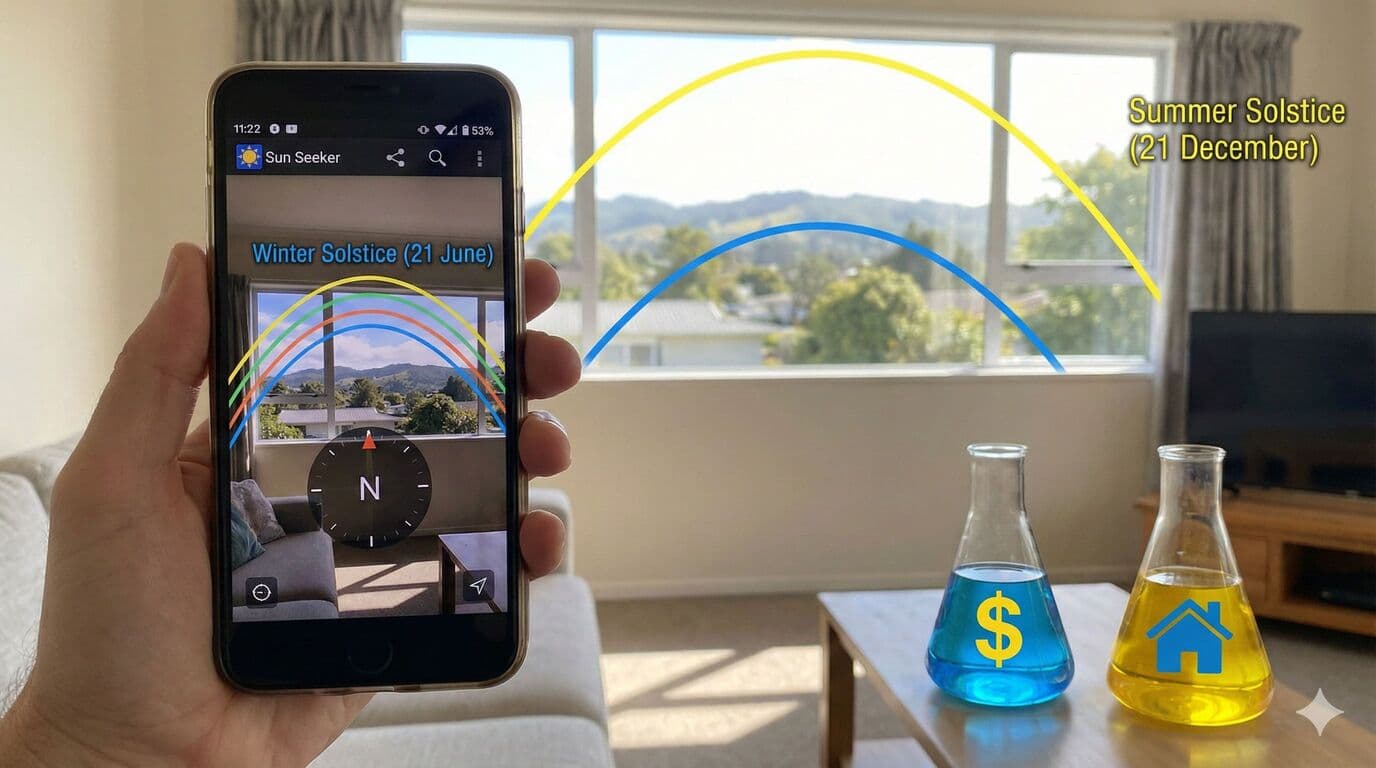
Sun Seeker uses your phone's camera combined with GPS and compass data to overlay the sun's path directly onto your view. Point your camera at any direction, and you will see coloured arcs showing where the sun travels at different times of year.
The app displays three primary path lines. The blue line shows the winter solstice path on 21 June, when the sun is at its lowest. This is the critical line for New Zealand property buyers because it shows the minimum sun exposure your property will receive. The yellow line indicates the summer solstice path on 21 December, when the sun reaches its highest point. The green line shows the current day's sun path, which is useful for understanding today's conditions.
Beyond the path lines, Sun Seeker displays hourly position markers along each arc. These show exactly where the sun will be at any given hour on any given day. You can stand in a living room and immediately see whether the afternoon sun will actually reach the windows, or whether that neighbouring building blocks it during the hours you would actually be home.
Using Sun Seeker at Property Viewings
The app proves most valuable during open homes and property inspections. Here is a practical approach for evaluating any property.
Start outside the front of the house. Open Sun Seeker and observe the winter sun path (blue line). Note where it rises and sets relative to the building. A house with living areas facing that winter sun path will receive natural warmth and light during the coldest months.
Move to the main living areas and repeat the process. Hold your phone up and pan around the room, watching where the sun paths cross the windows. If the winter path sits below the window line, direct sunlight will never enter that room during winter. If trees or buildings block the path, the same result occurs.
Check outdoor entertaining areas. That deck might be perfect for summer barbecues, but will it receive any winter sun for morning coffee? The app reveals whether you will actually use outdoor spaces year-round or only seasonally.
Pay particular attention to neighbouring developments. An empty section next door might seem like a bonus now, but a two-storey house built there could completely block your winter sun. Sun Seeker lets you imagine how a potential neighbour would affect your light.
Understanding North-Facing Orientation in NZ
For New Zealand properties, a north-facing living area orientation between 20 degrees west and 30 degrees east of true north is considered optimal. This range maximises winter sun exposure while preventing excessive summer heat.
True north differs from magnetic north by approximately 22 degrees in New Zealand, depending on your location. Sun Seeker uses true north in its calculations, giving accurate results for property evaluation. When estate agents describe a property as "north-facing," you can verify this claim precisely.
Properties on sloping sections add complexity. A north-facing slope is ideal, allowing sun to reach the house even when the winter sun is low. A south-facing slope can be problematic, with the land itself blocking precious winter light.
Healthy Homes Standards and Sunlight
New Zealand's Healthy Homes Standards recognise the importance of heating and ventilation, but sunlight remains an often-overlooked factor in home health. Dampness problems are exacerbated by lack of natural light, and properties that never receive direct sun can struggle with mould and condensation.
While the standards focus on installed heating capacity, a home with good sun exposure naturally maintains more comfortable temperatures. This reduces reliance on heating systems and creates a healthier indoor environment.
For rental property investors, understanding sun exposure before purchase can affect long-term maintenance costs. Properties that never dry out naturally require more attention to ventilation and are more likely to develop problems that affect tenant health and satisfaction.
Cost and Getting Started
Sun Seeker costs $16.99 on the App Store and Google Play. While not cheap compared to free alternatives, the investment is minimal compared to a property purchase. Making the right decision about sun exposure can save thousands in heating costs and affect your quality of life for years.
The app requires no internet connection after installation, making it usable anywhere including remote properties without cellular coverage. It works immediately after download with no account creation or subscription required.
The developers also created companion apps including Moon Seeker for tracking lunar cycles and Wind Seeker for understanding wind patterns. These can be useful for lifestyle block buyers or those considering solar panel installations.
Alternative Tools
For those wanting a free alternative, Shadowmap is a browser-based tool that uses 3D building data to simulate shadows throughout the year. It works well for properties in cities with complete building data but less effectively for standalone houses or rural properties.
Google Earth Pro includes a sun simulation feature that shows shadows at different times of day throughout the year. This works best when used before viewing a property to understand the general orientation and potential issues.
Your phone's compass app can verify orientation claims, though it only shows magnetic north. Remember to adjust for the approximately 22-degree magnetic declination in New Zealand.
What to Look For in Each Season
The seasonal variation in New Zealand is substantial, and understanding this helps interpret what Sun Seeker shows you.
During winter (June and July), the sun rises around 7:30am and sets around 5:30pm. It remains low in the sky, reaching only about 30 degrees above the horizon at solar noon. Shadows are long, and neighbouring obstacles have maximum impact. This is when sun exposure matters most for home heating.
During the equinoxes (March and September), the sun rises due east and sets due west, reaching about 52 degrees elevation at noon. These transitional periods give a middle-ground view of sun exposure throughout the year.
During summer (December and January), the sun rises around 6:00am and sets after 9:00pm. It reaches over 70 degrees elevation at noon, nearly overhead. Shadows are minimal, and most properties receive abundant light. However, poorly oriented houses may overheat, making north-east or north-west orientation preferable to pure north.
Beyond the Purchase
Sun Seeker remains useful after you buy a property. Planning a garden? The app shows which areas receive enough sun for vegetables versus which suit shade-tolerant plants. Installing solar panels? Understanding the precise sun path optimises panel placement and angle.
For renovation planning, the app helps decide where to add windows or skylights for maximum natural light. Extending a home? Ensure the new structure does not block sun from reaching existing living areas.
An Investment That Pays Back
The Mortgage Lab team has used Sun Seeker since its earliest versions, back when iPhones first introduced augmented reality capabilities. Over years of property inspections and client consultations, we have seen buyers avoid properties that looked perfect but would have been miserable to live in, and conversely, discover hidden gems that others overlooked because the sun was not shining during the open home.
Sunlight is one of the few things you cannot change about a property. You can renovate the kitchen, extend the living room, and landscape the garden. But if the neighbours block your sun, that problem stays forever. For the cost of a takeaway dinner, Sun Seeker ensures you make this decision with full knowledge rather than hopeful assumptions.
Need Help With Your Mortgage?
Our expert advisers are here to guide you through every step of your mortgage journey. Get in touch for a free, no-obligation consultation.
Talk to an Adviser